
Fair minutes without a clipboard.
The lineup on a pitch, a sub in two taps, and every player's minutes adding up while you coach. The family follows from a link, and the roster is encrypted on your phone before it reaches us.
Open the web appGet early access
Web app live (still named PitchBoard).1 iPhone app in testing.Free until launch; then one low price per team, everyone included. No ads.

18:25
1st half · game time · 11:35 left2
Two taps per sub, logged with the minute.Every player's minutes, adding up live.

Equal time is a promise coaches make to parents.
The clipboard never survived the second half. This is the book I wanted to keep from the touchline, and the one I wanted my team's families to have without handing anyone their kids' names.Ryan M
Minutes
Every player's time, adding up while you coach.
The subs you make are the record. Tracking starts at kickoff from the pregame lineup, with minutes in goal kept apart.
Fewest minutes first. The bench list puts the least played on top, and at half time they are the first thing on the screen.
Up by four? A banner says to play a player down.3
An example, sped up · a game minute a second
On the field
- Ruby10′
- Leo10′
- Max6′
Bench, fewest first
- Ben0′
- Kai4′
- Sam5′

Subs
Two taps, logged with the minute.
Tap who comes off, then who comes on. The sub lands in the log with the half and the minute. Undo for six seconds, or back-date it if you were late to the phone.
Change formation mid-game and the players move to the nearest spot.

The link
The family follows from a link.
One link for all the parents. The score, the clock, the formation and each goal as it happens, in any browser. No app, no account (what the family sees).
A parent can log one thing: a second link lets them tap in keeper saves, shots, or corners and free kicks, on their own phone. Their taps land in your scorebook under the name they give.4
Other coaches join by invite and log the same game from their own phones.
The game link shows first names (on the lineup, with each player's number beside the name), or numbers only if you switch names off. Send it to the team's families and not further.

The log, and the lock screen
A goal in three taps, on every coach's lock screen a moment later.
We scored, who scored, the assist. Everyone on the field comes first. Not sure who scored? Pick later; the log keeps a red reminder until you do.
Saturday, October 10
10:42
The score and the clock on every coach's lock screen, with the last goal, who is in goal and who has been on longest. Half time rings as an alarm, even locked. The card passes through our server as plain text and is not stored (the ledger).
On your wrist
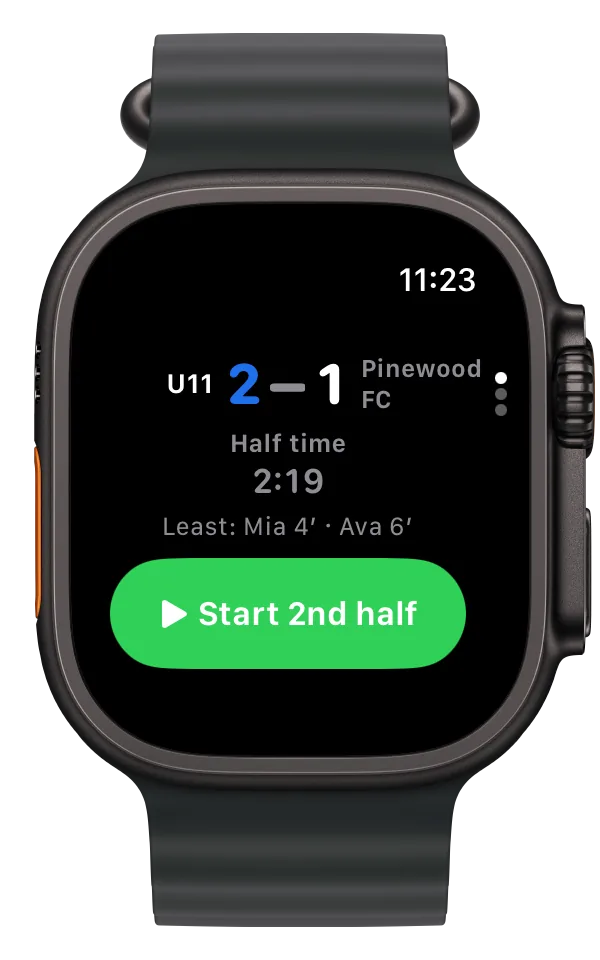
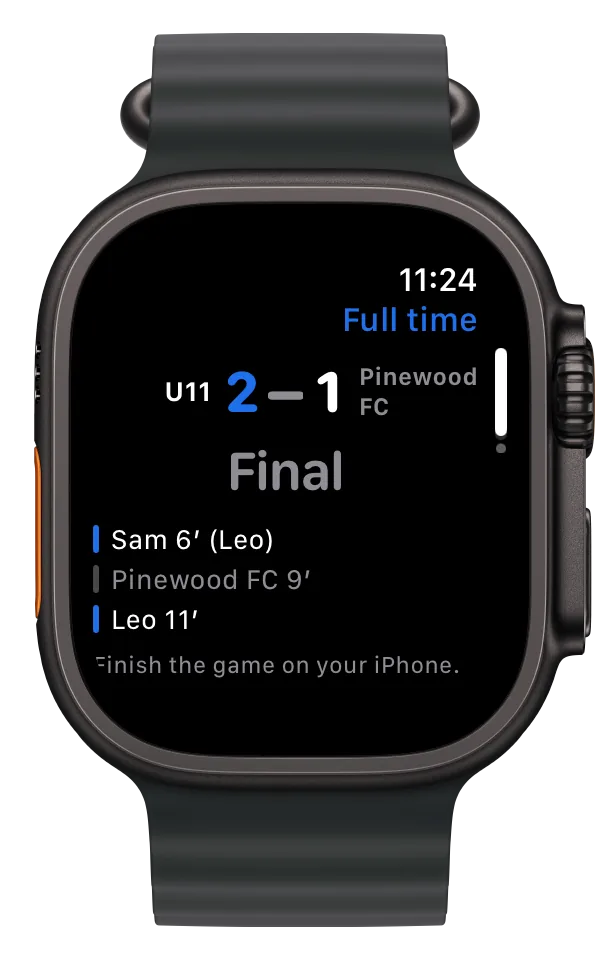
The game on Apple Watch, with the phone in your pocket.
Score, clock, Goal and Against on your wrist. A goal logged there is the same entry as one from the phone, with Undo.
The Subs page names the next change: who comes off and who has played least. At half time the least played are the first thing on the screen.
The Apple Watch app is being built with the iPhone app. It isn't in TestFlight yet.
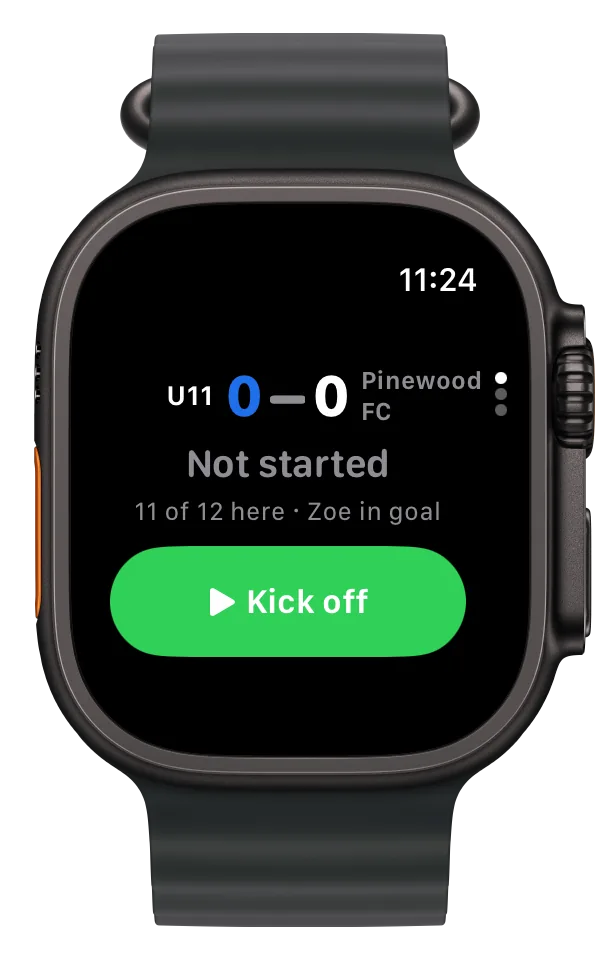
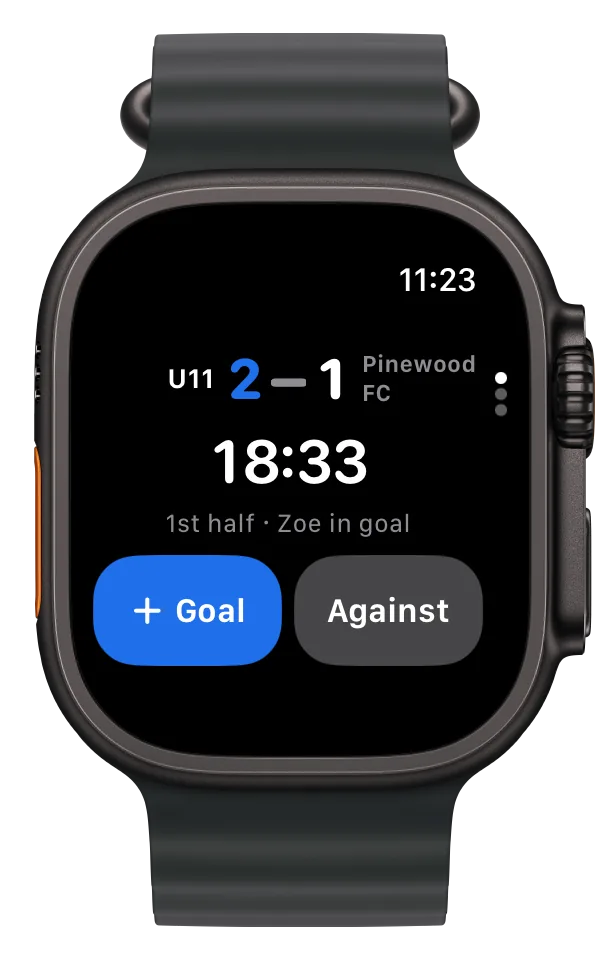
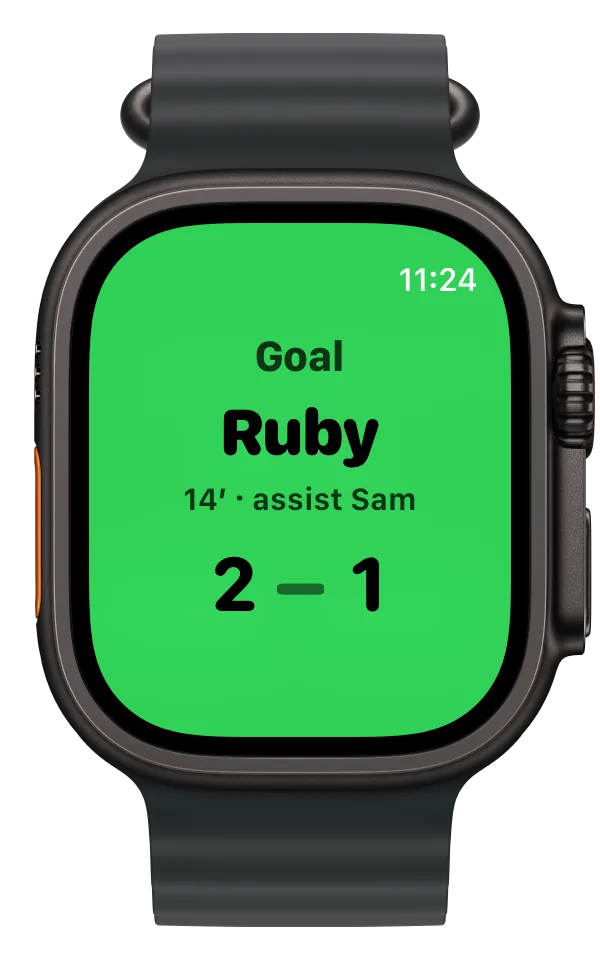
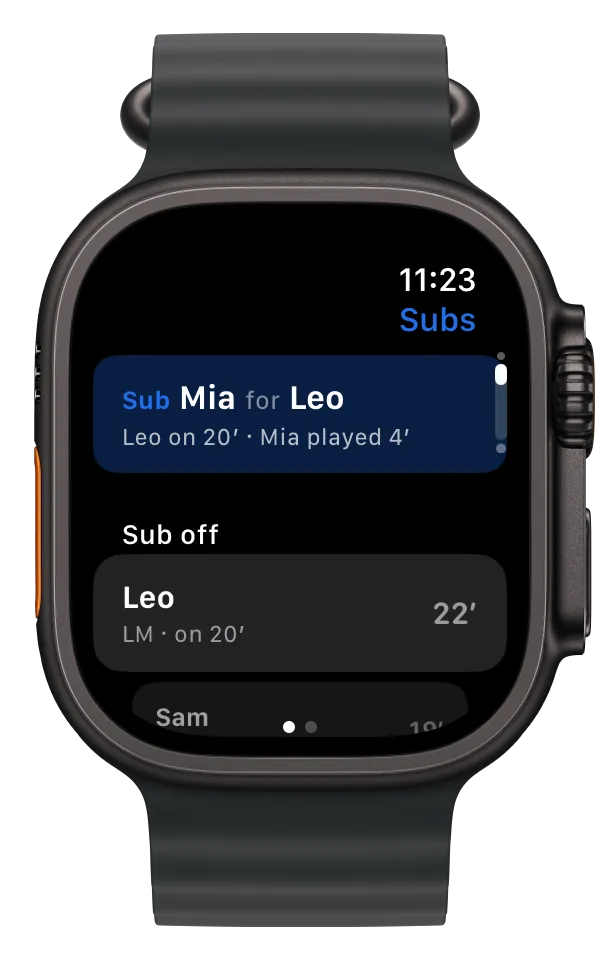
The season, on a computeron your phone
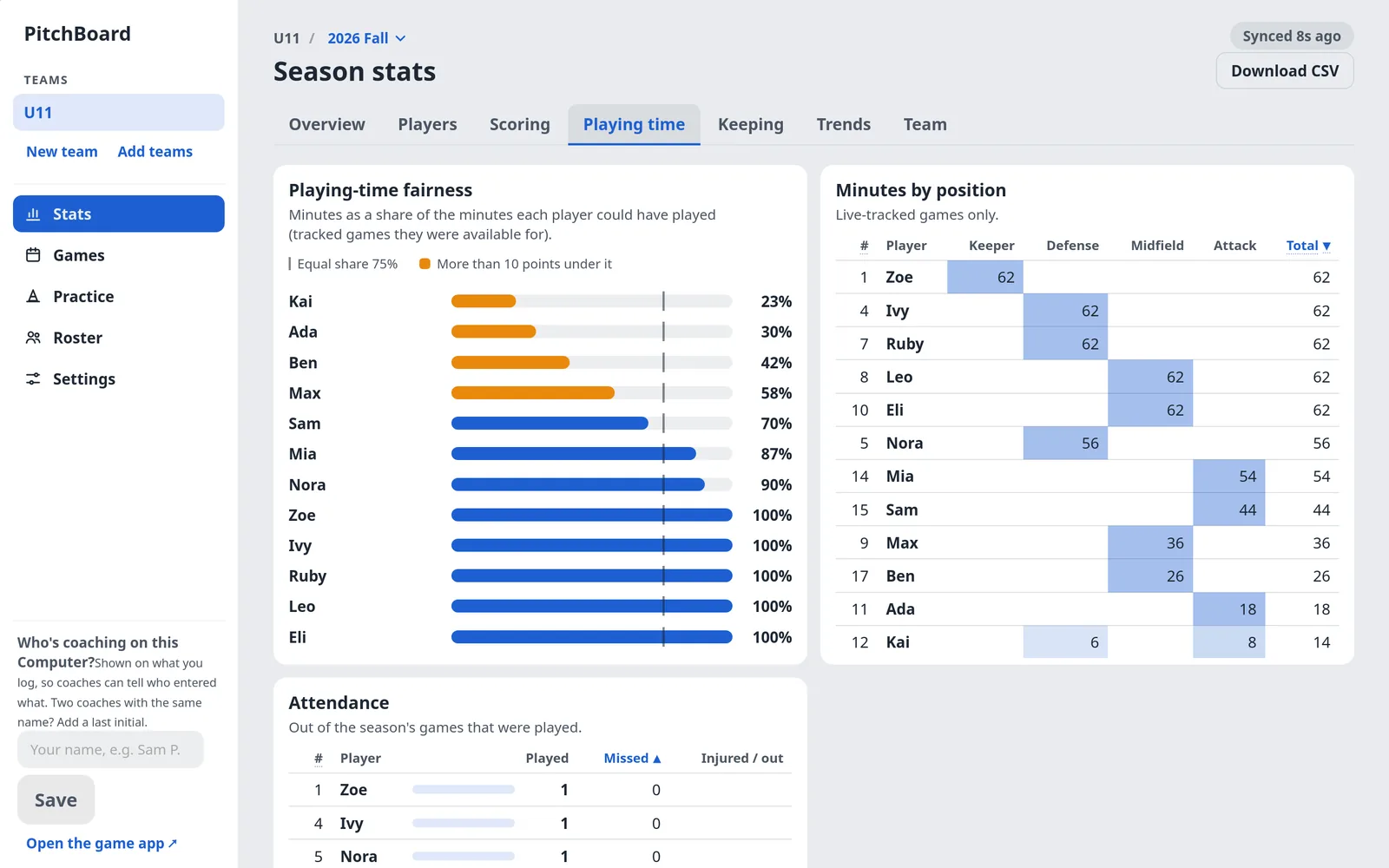
Playing time you can stand behind when a parent asks.
Every player's minutes against the equal share. The ones under the line start next week.
The record, scoring, keeping and trends, every table sortable and downloadable as CSV. Season stats stay with the coaches; the family's link never shows minutes.6
On Android
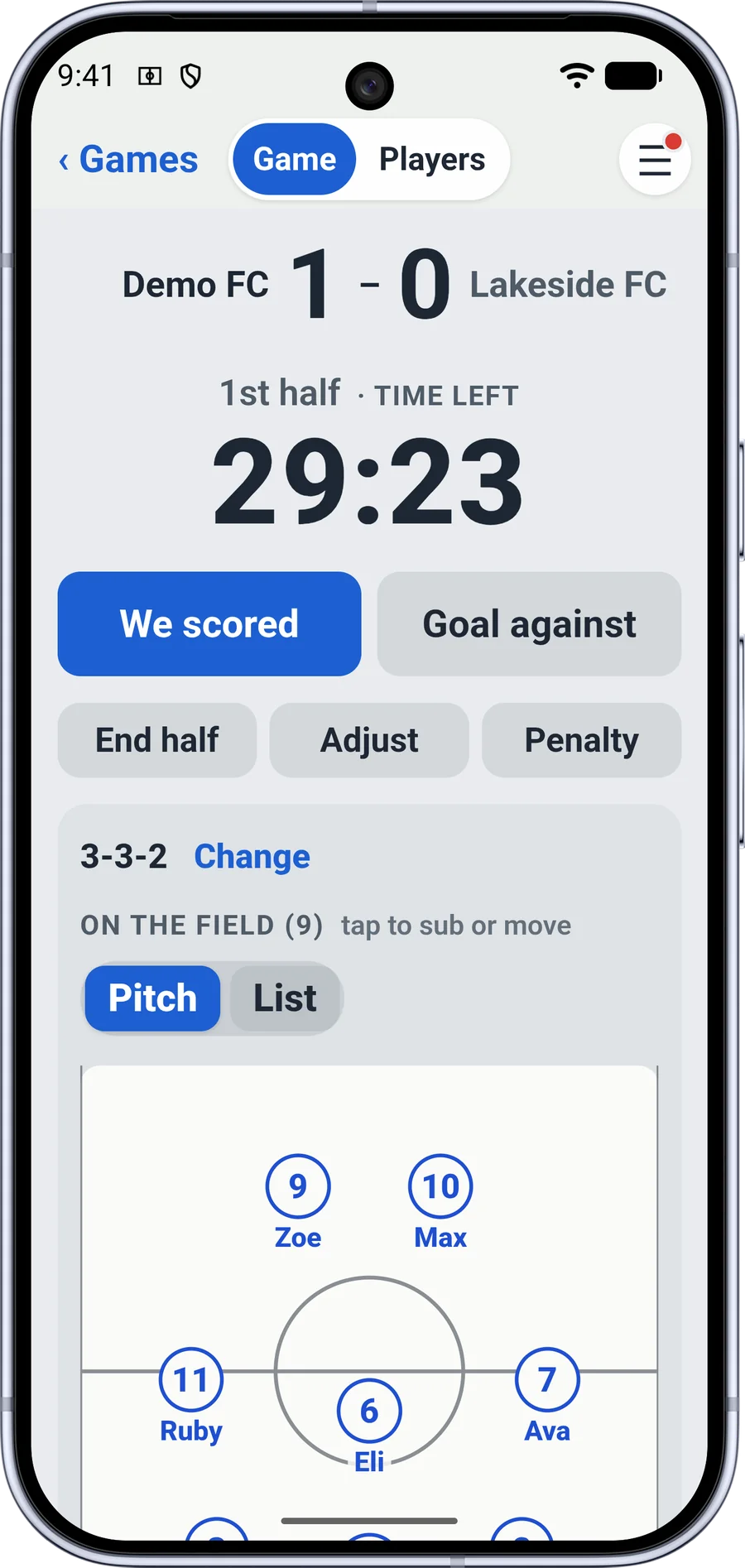
The same game screen on Android.
ClubClock Soccer for Android™ is the same app as the web and the iPhone: the lineup, the clock, the log and the family's link.
The game rides along as an ongoing card in your notifications while the clock runs.
Not on Google Play yet. The early-access list gets a note when its beta opens.
How it's different.
Team apps organize the season and show ads. Sub timers count minutes on one phone. Neither keeps the book or lets the family in. ClubClock works alongside your team app: schedules and messages stay there; the game lives here.
| Feature | ClubClock Soccer | Team apps paid for by ads | Sub timers on one phone |
|---|---|---|---|
| Who can read the roster | Only your coaches' phones; families see first names on a game link | The company; their App Store labels list data used to track you | Only that phone |
| Minutes per player, live | Yes, the bench sorted by fewest minutes | No | Yes |
| Goals, assists, keepers, season stats | Yes, with CSV downloads on the computer | Score posts; stats on some, behind a plan | Rarely |
| Family follows live | One link, no app, no account | With an account or their app | No |
| A parent logs saves or shots | Yes, from a link | No | No |
| Coaches log together | From their own phones; entries merge | Posts from anyone with the app | No |
| Ads | None | Yes, unless you pay | Usually none |
Categories, not names, because products change.7
Built for a field with one bar.
Saved on the phone first, sent when it can be. With no signal the app keeps working; when the signal comes back the save goes through, and if two phones changed the game, the changes merge.
- 2 tapsa sub, logged with the half and the minute
- 30 daysevery version of a team is kept, so a mistake can be undone
- 5 sbetween syncs while a game runs, so your assistant's sub shows on your phone
- 0players' names stored where we can read them; no updates are pushed while a game may be under way
Watched and copied. The service is checked from outside every five minutes, and the team files copy to a second region every night.
Not tied to one phone. Sign in on a new phone and another of your team's devices hands the team over, encrypted so only those two can read it.
What our server can and can't see.
A player is a first name and a jersey number; a last name is optional and shows only on the computer. The team's file is encrypted on your phone with a key we never receive: the key rides inside the invite link, in the part of the address a browser never sends to any server, ours included. We store the encrypted file and can't open it. No ads, no analytics, no tracking. Here is the whole list.
Encrypted on your phone. We can't read it.
- Names and jersey numbers
- Games: goals, assists, subs, minutes, keepers, the clock
- Lineups, availability, injuries
- Season stats and team settings
- A parent's taps from a stats link, and their name
- Feedback you send from the app
Readable on our side.
- Your email and name, for signing in
- Which coaches belong to the team, with role, name and email
- A random id per device, when it joined and last saved
- The lock-screen cards while a game runs Team names, score, clock, the last scorer's and the keeper's first names, and the stats lines each phone chose. Passed to the team's other iPhones and not stored.
- Usage counts How many games, which features, the kind of phone, country and state. Never a name, a score or an opponent.
- Request logs, kept 90 days
To save the weather with a game, your phone asks Open-Meteo for the forecast at the field's town; it sends the town, not the team. The family's game link shows first names (or jersey numbers, if the team switches names off) to anyone who has it. All of it is spelled out in the privacy policy.
Questions a coach asks first.
Does every parent need the app?
No. The game link opens in any browser and needs no app and no account. Send one link to all the team's families.
What if two of us log the same game?
That's normal. Each coach logs from their own phone, and every sub and goal is its own entry in the log, so both land. Two coaches who change the same setting at once: the later change wins. An assistant can join from your invite without an account for two weeks, then signs in with an email.
Does it work at a field with no signal?
Yes. Everything is saved on the phone first and sent when a bar comes back. The parents' link needs signal on their end to update.
Can other parents see my child's minutes?
No. The game link shows the score, the clock, the goals and the lineup. Minutes and season stats stay with the coaches.
What does it cost?
Free while in testing. After launch, one low price per team, with every coach, parent and grandparent included. No per-user fees, no ads. Nobody's data is sold.
What happens to the team if I stop?
Another coach on the team keeps it. If you are its only owner, you make another coach the owner before you delete your account; a team nobody else can reach is deleted with your account. Season stats download as CSV on a computer any time.
More on the support page.
ClubClock Soccer today
Open the web appGet early access
Coming soon
 Coming to Google Play
iPhone app in testing by TestFlight; Android next. Neither is in a store yet.
- Web appLive at pitchboard.r26.dev. Any phone, any browser; a computer for the season stats.
- iPhone appIn testing. Not in the App Store yet.
- AndroidBeing built. The early-access list gets a note when its beta opens.
- Early accessOpen for iPhone, by TestFlight. Get early access.
- Not yetAn export of the whole team file. Season stats do download as CSV on a computer.
- HelpQuestions or the privacy page.
Notes
- ClubClock Soccer still runs under its first name, PitchBoard, at pitchboard.r26.dev; it moves to a ClubClock address later and your team comes along. It works in Safari or Chrome; add it to your home screen to open it like an app. Back
- A continuous clock, the way youth soccer is played: no pause button on the game screen, half lengths you set, extra time and a shootout for knockout games, shown as time played or time left. It stores the moment it started, not a count, so it is still right after the phone sleeps in your pocket. Back
- Four goals up, then five, the way most youth leagues ask. It's a team setting, for league and friendly games; tournaments skip it. Back
- A stats link works on one phone, the first one that logs with it, and its taps are tagged with who logged them; the follow link is for everyone. Both end after a day, or when the coach stops them. Back
- Drawn from the app's own card layout; the real card follows the phone's light or dark. The iPhone app is in testing today. Back
- Finished games only. A game whose tracking started or stopped more than two minutes off the clock is marked partly tracked and left out of the minutes. Back
- Checked against vendors' sites and App Store listings on October 28, 2026. Back